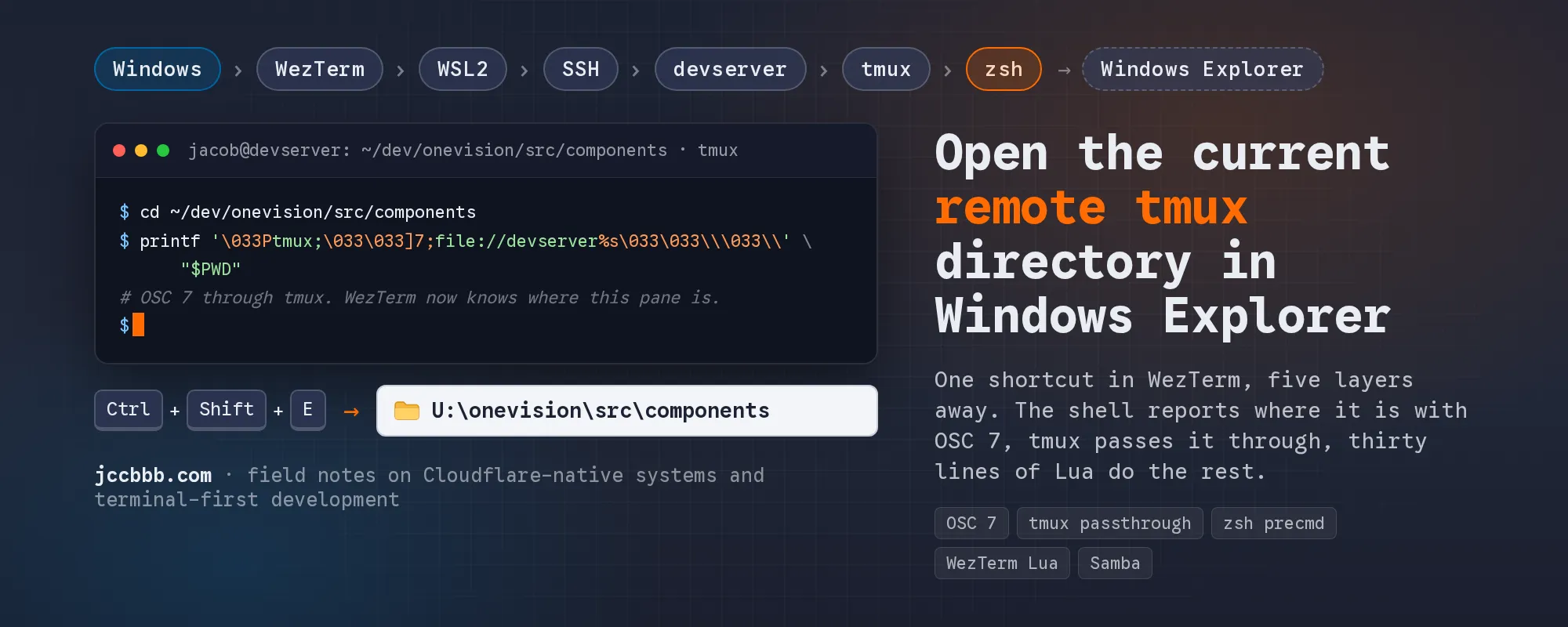
My development setup has accumulated a few layers over time. WezTerm runs on Windows, my shell starts in WSL2, from there I SSH into a development server on my local network, and most of the actual work happens inside tmux on that server.
The source files on that server are also exposed to Windows through Samba. That left me wanting one small convenience: while standing anywhere in the remote shell, press Ctrl+Shift+E and get that exact directory open in Windows Explorer.
The shortcut itself is nothing. The path from a remote zsh process to explorer.exe turned out to be the interesting part, so this post is mostly about that.
Table of contents
Open Table of contents
- My setup
- What I wanted
- Why explorer.exe . isn’t enough
- What WezTerm actually knew
- OSC 7: sending the directory through the terminal
- SSH is not the complicated part
- tmux is the extra layer
- tmux passthrough
- Reporting the directory automatically from zsh
- Mapping the remote path to U: in WezTerm
- The Lua, line by line
- The safer version
- The whole path, end to end
- Why it works per pane
- What Samba does, and doesn’t do
- The container caveat
- The part I had wrong
- Final configuration
- What I learned
My setup
- Local machine: Windows 11.
- Terminal: WezTerm. It starts WSL2 Ubuntu by default.
- From WSL I SSH into a development server on the LAN. In this post it’s called
devserver. - On the server I run tmux, and inside tmux I run zsh.
- The projects live under
/home/jacob/dev/. I cd into them all day, and I often start Claude Code and claude-sandbox dev containers from those directories. - The dev directory on the server is shared with Samba and mapped as a network drive on Windows.
The mapping that matters here:
Remote Linux              Windows
/home/jacob/dev/          U:\
/home/jacob/dev/demo      U:\demo
/home/jacob/dev/onevision/src/components
                          U:\onevision\src\components
What I wanted
Stand in any project directory inside the remote tmux session, press Ctrl+Shift+E in WezTerm, and have Windows Explorer open the same directory on U:.
If I’m here on the server:
/home/jacob/dev/demoExplorer should open:
U:\demoAnd if I’m here:
/home/jacob/dev/onevision/src/componentsthe same shortcut should open:
U:\onevision\src\componentsIt also has to be pane-specific. I usually have several WezTerm tabs and panes connected to different projects, and the shortcut should use the directory of the pane I pressed it in, not some global “last known directory”.
Why explorer.exe . isn’t enough
On a plain Windows terminal this is a one-liner: explorer.exe . opens the current directory. The dot means “where this shell is standing”, and Explorer runs on the same machine as the shell, so everything agrees on what “here” means.
In my case the shell where the current directory exists is several layers away from Windows:
flowchart TD
W[Windows] --> WT[WezTerm] --> WSL[WSL2] --> S[SSH] --> D[devserver] --> T[tmux] --> Z[zsh] --> P["/home/jacob/dev/project"]
The Windows process running WezTerm has no idea what . means inside the remote zsh session. There are several different “current working directories” in that stack. WezTerm itself has one. The WSL shell has one. The ssh client has one. The zsh process inside tmux on the server has the one I actually care about, and it’s the only one that knows it.
So the question is not “how do I open Explorer”. It’s “how does the remote shell tell the terminal emulator where it currently is”. Everything else follows from that.
What WezTerm actually knew
Before building anything I wanted to see what WezTerm thought the current directory was. WezTerm’s key bindings can run Lua, and a pane object has a method for exactly this, so I added a temporary binding that just shows the value in a toast notification:
{
    key = "e",
    mods = "CTRL|SHIFT",
    action = wezterm.action_callback(function(window, pane)
        local cwd = pane:get_current_working_dir()

        window:toast_notification(
            "Current working directory",
            cwd and tostring(cwd) or "WezTerm does not know the current directory",
            nil,
            5000
        )
    end),
},.wezterm.lua
I was connected to jacob@devserver, standing in /home/jacob/dev/demo, and pressed the shortcut. WezTerm reported:
file://jacobzenbook/home/jacobjacobzenbook is my laptop, so this is the home directory of the local WSL shell, the one that started the ssh command. WezTerm had never heard anything from the remote side. It was still holding the last directory it had been told about, which came from the local shell before I ran ssh.
That answered the first question. WezTerm does not automatically know the working directory inside a remote SSH, tmux and zsh session. And to be precise about what get_current_working_dir() does: it returns the working directory metadata WezTerm has received for that pane. It does not open a connection to the server and run pwd. If nobody has told WezTerm anything, you get whatever it last heard, or nil.
So the remote shell has to tell it. There is a standard way to do that.
OSC 7: sending the directory through the terminal
Terminal communication is not just visible characters. Programs write bytes to the terminal, and most of those bytes are text that ends up on screen, but some of them are control sequences: the terminal emulator parses them and does something instead of printing them.
Colours are the everyday example. When a program prints red text, it doesn’t send “red” anywhere separately. It writes an escape sequence into the same byte stream as the text, the terminal reads it, switches colour, and keeps rendering. The same mechanism is used to reset formatting, change the window title, create clickable hyperlinks, put things on the clipboard, and report metadata.
OSC stands for Operating System Command. It’s one family of these sequences, and OSC 7 is the one that, by convention, tells the terminal emulator the current working directory. Conceptually the remote shell wants to send this:
ESC ] 7 ; file://devserver/home/jacob/dev/demo ESC \The pieces:
ESC ]                                  start of an OSC sequence
7;                                     OSC command number 7
file://devserver/home/jacob/dev/demo   the working directory as a file URI
ESC \                                  string terminator, end of the sequence
Or as a picture:
OSC 7
└── file://devserver/home/jacob/dev/demo
The directory is sent as a file:// URI with a hostname in it, not as a bare path. That’s part of the convention: a terminal can be attached to shells on different machines, and /home/jacob on the laptop is not /home/jacob on the server.
When WezTerm sees this sequence in a pane’s output it doesn’t print anything. It parses the URI and stores it as that pane’s current working directory. That’s the value get_current_working_dir() returns. It’s metadata riding along in the terminal stream. There is no second connection from WezTerm to the server, and there doesn’t need to be.
SSH is not the complicated part
I expected SSH to be a problem here. It isn’t.
SSH doesn’t need to understand OSC 7 at all. From its point of view the remote shell produced some bytes, and its job is to carry those bytes to the client, encrypted, and hand them to the local terminal. Whether a byte is the letter “a” or part of an escape sequence is not something SSH cares about.
flowchart TD
Z[zsh] -- bytes --> S[sshd on devserver]
S -- encrypted transport --> C[ssh client in WSL2]
C --> P[local pty]
P --> W[WezTerm terminal parser]
The same stream carries everything:
normal output
normal output
OSC 7 metadata
prompt
normal output
WezTerm is the component at the end that separates printable text from the control sequences it recognises. SSH is transport. That’s it.
tmux is the extra layer
My chain has one more thing in it, and this is where it stops being simple.
flowchart TD
Z[zsh] --> T{{tmux}} --> S[SSH] --> W[WSL2] --> WT[WezTerm]
tmux is not a transparent pipe. Towards the programs running inside it, tmux is the terminal: it’s what zsh writes to. Towards the outer terminal, tmux is itself a program producing output. In between, it has to interpret what the inner programs send, because it draws panes, windows and a status bar, and it has to redraw all of that correctly when you switch windows or resize.
So tmux parses control sequences from the inside, keeps its own model of what each pane’s screen looks like, and then produces its own output for the outer terminal. An escape sequence written by a program inside tmux is not necessarily forwarded unchanged to WezTerm. tmux may act on it, drop it, or translate it.
I confirmed that experimentally. Inside tmux on the server, standing in /home/jacob/dev/demo, I sent a plain OSC 7 by hand:
printf '\033]7;file://devserver%s\033\\' "$PWD"\033 is ESC in octal, so this is exactly the sequence from the previous section with $PWD filled in. I pressed Ctrl+Shift+E again. WezTerm still said:
file://jacobzenbook/home/jacobThe sequence had gone into tmux and had not come out the other side in a form WezTerm acted on.
tmux passthrough
tmux has a way to say “don’t interpret this, just pass it to the outer terminal”: you wrap the sequence in a DCS sequence with a tmux; prefix. DCS is Device Control String, another family of terminal sequences, started with ESC P and ended with ESC \. tmux recognises the ESC P tmux ; form as a passthrough request, unwraps the content, and writes it to the outer terminal as-is.
There is one catch: inside the wrapper, every ESC byte has to be doubled. Otherwise tmux would read the inner ESC \ as the end of the wrapper and stop early.
So I sent the same OSC 7, wrapped:
printf '\033Ptmux;\033\033]7;file://devserver%s\033\033\\\033\\' "$PWD"Pressed Ctrl+Shift+E. WezTerm reported:
file://devserver/home/jacob/dev/demoThat was the key test. From that moment I knew the whole path worked: zsh, through tmux, through SSH, through WSL, into WezTerm’s pane state.
What looks like a horrible printf command is actually just two terminal control sequences nested inside each other:
flowchart TD
subgraph DCS["DCS passthrough wrapper for tmux"]
O["OSC 7<br/>file://devserver/home/jacob/dev/demo"]
end
Broken down byte by byte:
\033Ptmux;        ESC P tmux ;    start of the tmux passthrough wrapper
\033\033]7;       ESC ESC ] 7 ;   start of OSC 7 (the ESC is doubled)
file://devserver  the host part of the URI
%s                replaced by $PWD, the directory zsh is standing in
\033\033\\        ESC ESC \       end of OSC 7 (doubled ESC, then a backslash)
\033\\            ESC \           end of the passthrough wrapper
In the shell string a single backslash has to be written as \\, which is why the end of the command is a small pile of them. The doubled ESC bytes are there because the OSC sequence is being transported inside another sequence. tmux removes one layer of doubling when it unwraps, and WezTerm receives a normal OSC 7.
If you want an analogy: it’s like putting an encoded string inside another encoded string, where the inner one has to be escaped so the outer parser doesn’t trip over it. That’s only an analogy. Terminals don’t have a generic escaping rule, this is specifically how tmux’s passthrough is defined.
One thing to know if you try this and nothing happens: since tmux 3.3 the passthrough sequence is only honoured when the allow-passthrough option is on. If your tmux is 3.3 or newer, put this in ~/.tmux.conf:
set -g allow-passthrough onReporting the directory automatically from zsh
Sending the sequence by hand proves the mechanism, but I obviously don’t want to type a printf after every cd. The shell should report where it is on its own.
The shell on the server is zsh:
echo $SHELL
/usr/bin/zsh
zsh has hooks that run at specific points, and the useful one here is precmd: it runs every time zsh is about to display a prompt. After a command finishes, after a cd, after you just press Enter on an empty line. If the directory can have changed, a prompt is about to be drawn, and precmd runs right before it.
So this went into ~/.zshrc on the server:
# Report current working directory to WezTerm through tmux (OSC 7)
function wezterm_set_cwd() {
    printf '\033Ptmux;\033\033]7;file://devserver%s\033\033\\\033\\' "$PWD"
}

autoload -Uz add-zsh-hook
add-zsh-hook precmd wezterm_set_cwd~/.zshrc
Line by line:
function wezterm_set_cwd()defines a shell function. It contains the exact printf that worked in the manual test, with$PWDfor the current directory.autoload -Uz add-zsh-hookloads zsh’s helper for managing hook functions.-Uskips alias expansion while loading it,-zloads it in zsh mode. That’s the standard incantation, not something I invented.add-zsh-hook precmd wezterm_set_cwdregisters the function as a precmd hook, so it runs before every prompt. Using the helper instead of assigningprecmd()directly means other tools that also want a precmd hook (a prompt theme, for instance) don’t overwrite each other.
The sequence of events after that:
flowchart TD
A[you run a command or cd] --> B[command completes]
B --> C[zsh prepares the next prompt]
C --> D[precmd hooks run]
D --> E["wezterm_set_cwd()"]
E --> F["read $PWD"]
F --> G["OSC 7, wrapped for tmux"]
G --> H["tmux unwraps, SSH carries,<br/>WSL forwards"]
H --> I[WezTerm stores the pane cwd]
I --> J[prompt is displayed]
Which means that after this:
cd /home/jacob/dev/demothe next prompt causes WezTerm to receive:
file://devserver/home/jacob/dev/demoand after this:
cd /home/jacob/dev/onevision/srcthe next prompt updates it to:
file://devserver/home/jacob/dev/onevision/srcNo polling. No extra SSH connection. No file on disk with the current directory in it. The shell reports its own state at the moment it’s about to show you a prompt, and it costs one printf.
Mapping the remote path to U: in WezTerm
Now WezTerm knows where the remote shell is. The rest is string handling in Lua and one process spawn. This is the binding that worked:
{
    key = "e",
    mods = "CTRL|SHIFT",
    action = wezterm.action_callback(function(window, pane)
        local cwd = pane:get_current_working_dir()

        if not cwd then
            return
        end

        local path = tostring(cwd)

        -- Example:
        -- file://devserver/home/jacob/dev/demo
        -- becomes:
        -- U:\demo
        path = path:gsub("^file://devserver/home/jacob/dev/?", "")
        path = path:gsub("/", "\\")

        local windows_path = "U:\\" .. path

        wezterm.run_child_process({
            "explorer.exe",
            windows_path,
        })
    end),
},.wezterm.lua
The Lua, line by line
key = "e" and mods = "CTRL|SHIFT". The key and the modifiers. WezTerm’s binding syntax takes modifiers as a string with | between them.
wezterm.action_callback(...). Most bindings map to a built-in action. This one wraps a Lua function so the binding can run arbitrary code.
function(window, pane). WezTerm calls the function with the window and the pane the key was pressed in. The pane is the important one. The current working directory is per pane, not per window and not global, so if I have three tabs connected to three projects, this argument is what makes the shortcut resolve to the right one.
local cwd = pane:get_current_working_dir(). Reads the metadata WezTerm already has for this pane, which is what the OSC 7 from zsh put there. To say it one more time because it’s the thing I initially got wrong: this does not SSH anywhere and does not run pwd. It’s a lookup in WezTerm’s own state.
if not cwd then return end. If WezTerm has never received a directory for this pane the value is nil, and there’s nothing sensible to open.
local path = tostring(cwd). In current WezTerm versions the return value is a Url object rather than a plain string. tostring turns it into the URI text:
file://devserver/home/jacob/dev/demopath = path:gsub("^file://devserver/home/jacob/dev/?", ""). gsub is Lua’s search-and-replace. The first argument is a Lua pattern, the second is what matches get replaced with, here the empty string, so this deletes the prefix.
file://devserver/home/jacob/dev/demo
                                ▼
                              demo
In the pattern, ^ anchors the match to the start of the string, so it only removes the prefix if the string actually begins with it. The /? at the end makes the trailing slash optional, so both .../dev/demo and .../dev (when standing in the root itself) come out without a leading slash. One Lua detail: gsub returns two values, the new string and the number of replacements. Assigning to a single variable keeps the first and drops the second, which is what we want.
path = path:gsub("/", "\\"). Replace every forward slash with a backslash.
onevision/src/components
            ▼
onevision\src\components
In Lua source, as in most languages, a backslash inside a string starts an escape, so a literal backslash is written "\\". The pattern "/" has no special characters, so this is a plain replacement.
local windows_path = "U:\\" .. path. Prepend the drive. .. is Lua’s string concatenation operator (not +, which is arithmetic and would throw on strings). "U:\\" is the three characters U:\, so the result is:
U:\onevision\src\componentswezterm.run_child_process({ "explorer.exe", windows_path }). Spawn a process with an argument list. The crucial thing is where it runs: this is executed by the WezTerm process, which is a Windows process on my laptop. It does not run explorer.exe on the development server, and it doesn’t go through WSL either. Conceptually it becomes:
explorer.exe "U:\onevision\src\components"run_child_process waits for the command to return, but explorer.exe hands the request to the already running Explorer and exits immediately, so the blocking is not noticeable. And Explorer can open U:\onevision\src\components because that drive is the Samba mapping of /home/jacob/dev on the server.
The safer version
The binding above is deliberately minimal, which is what makes the transformation easy to follow. It’s also a bit trusting. Press Ctrl+Shift+E in a pane that is not connected to the dev server, say a plain local WSL shell in /home/jacob, and the URI is file://jacobzenbook/home/jacob. The prefix pattern doesn’t match, nothing is removed, the slashes get flipped, and Explorer is asked to open U:\file:\\jacobzenbook\home\jacob. Not dangerous, just wrong.
So the version I actually keep in my config checks that the directory belongs to the right host and lives under the right root before touching it. It also uses the Url object’s fields instead of string-matching the URI, which has a practical advantage: file_path is percent-decoded, so a directory with a space in its name comes back as a real space rather than %20. I keep a fallback for older WezTerm versions where the method returned a plain string.
local wezterm = require("wezterm")

-- Change these three for your own setup.
local REMOTE_HOST = "devserver"
local REMOTE_ROOT = "/home/jacob/dev"
local WINDOWS_ROOT = "U:\\"

local function open_remote_cwd_in_explorer(window, pane)
    local cwd = pane:get_current_working_dir()
    if not cwd then
        window:toast_notification(
            "Explorer", "WezTerm has no working directory for this pane", nil, 4000
        )
        return
    end

    -- Current WezTerm returns a Url object with .host and .file_path.
    -- Older versions returned the URI as a plain string.
    local host, file_path
    if type(cwd) == "string" then
        host, file_path = cwd:match("^file://([^/]*)(/.*)$")
    else
        host, file_path = cwd.host, cwd.file_path
    end

    if host ~= REMOTE_HOST then
        window:toast_notification(
            "Explorer", "Not a " .. REMOTE_HOST .. " pane: " .. tostring(cwd), nil, 4000
        )
        return
    end

    -- Must be REMOTE_ROOT itself or something inside it.
    local rest = file_path and file_path:sub(#REMOTE_ROOT + 1) or nil
    if not file_path
        or file_path:sub(1, #REMOTE_ROOT) ~= REMOTE_ROOT
        or (rest ~= "" and rest:sub(1, 1) ~= "/") then
        window:toast_notification(
            "Explorer", "Outside " .. REMOTE_ROOT .. ": " .. tostring(file_path), nil, 4000
        )
        return
    end

    -- /home/jacob/dev/onevision/src -> onevision\src
    local relative = rest:gsub("^/", "")
    relative = relative:gsub("/", "\\")

    local windows_path = WINDOWS_ROOT .. relative
    wezterm.run_child_process({ "explorer.exe", windows_path })
end

-- In the keys table:
{
    key = "e",
    mods = "CTRL|SHIFT",
    action = wezterm.action_callback(open_remote_cwd_in_explorer),
},.wezterm.lua
What changed compared with the minimal version:
- The three values that are specific to my machine are at the top, named. If you copy this,
devserver,/home/jacob/devandU:\are the things to change. - The host is checked. A local WSL pane reports
jacobzenbookand gets a toast instead of a nonsense path. - The root is checked with a plain prefix comparison using
sub, not a Lua pattern, so a root containing pattern characters would still work. The extrarestcheck makes sure/home/jacob/developmentis not accepted just because it starts with the same letters. - The string version of the URI is only used as a fallback, and the match
^file://([^/]*)(/.*)$splits it into host and path in one go. - Failures are visible. A toast saying why nothing happened beats silently doing nothing when I press the key in the wrong pane.
The whole path, end to end
The transformation of one directory, from the remote shell to Explorer:
flowchart TD
A["remote zsh<br/>/home/jacob/dev/<br/>onevision/src/components"] -- "OSC 7 via precmd" --> B["file://devserver/home/jacob/dev/<br/>onevision/src/components"]
B -- "WezTerm stores pane cwd" --> C[Ctrl+Shift+E]
C --> D[strip host and remote root]
D --> E["onevision/src/components"]
E -- "slashes become backslashes" --> F["onevision#92;src#92;components"]
F -- "prepend the drive" --> G["U:#92;onevision#92;src#92;components"]
G --> H[explorer.exe] --> I[Windows Explorer]
And the architecture, with the two machines separated:
flowchart TD
subgraph R["REMOTE: devserver"]
Z["zsh<br/>$PWD = /home/jacob/dev/<br/>project/src"] -- precmd --> F["wezterm_set_cwd()"]
F -- "OSC 7" --> T[tmux]
end
T -- "SSH: terminal byte stream<br/>(tmux passthrough)" --> C
subgraph L["LOCAL: Windows laptop"]
C[WSL2 / ssh client] --> P[WezTerm terminal parser]
P -- "stores pane cwd" --> U["file://devserver/home/jacob/dev/<br/>project/src"]
U -- "Ctrl+Shift+E" --> K[Lua key binding]
K -- "URI to Windows path" --> WP["U:#92;project#92;src"]
WP --> X[explorer.exe]
end
And a smaller one, because I think this is the picture that makes the whole thing click: normal output and the OSC metadata travel in the same stream, and only the last component separates them.
flowchart TD
Z[zsh output] --> A["#quot;build complete#quot;<br/>printable text"]
Z --> B["OSC 7 cwd<br/>terminal metadata"]
Z --> C["prompt<br/>text + control sequences"]
A --> T[tmux]
B --> T
C --> T
T --> S[SSH] --> W[WezTerm]
W -- printable --> SC[screen]
W -- "OSC 7" --> CW[pane cwd]
Why it works per pane
This is where doing it with terminal metadata pays off compared with, say, having the shell write its directory to a file that the shortcut reads.
WezTerm

Tab 1  devserver  /home/jacob/dev/coretours
Tab 2  devserver  /home/jacob/dev/onevision
Tab 3  devserver  /home/jacob/dev/festivalstugan
Each of those panes is its own SSH session with its own zsh, and each zsh reports its own $PWD on every prompt. WezTerm stores the value per pane. When I press Ctrl+Shift+E, the callback gets the pane the key was pressed in, function(window, pane), and reads that pane’s value. Three tabs, three directories, and the shortcut opens the right one every time without anything having to coordinate.
A single “current directory” file on disk would have needed some way to know which shell wrote it last, and it would have been wrong the moment I switched tabs.
What Samba does, and doesn’t do
It’s easy to mix up the two halves of this, so to be explicit: Samba does not tell WezTerm which directory the remote shell is in. OSC 7 does that.
Samba’s only job is to make the same remote filesystem reachable from Windows under a Windows path:
Remote filesystem          Windows mapping
/home/jacob/dev/           U:\
/home/jacob/dev/demo       U:\demo
Which means the complete solution is three separate responsibilities, and each piece knows nothing about the others:
- zsh and OSC 7 report where the remote shell currently is.
- WezTerm and the Lua binding read that report and translate the remote URI into a Windows path.
- Samba makes that Windows path point at the same files.
If any one of them is missing the shortcut does nothing useful, and none of them can replace another. Once I had that separation clear in my head, the whole thing stopped feeling clever and started feeling obvious.
The container caveat
Part of my motivation was that I often work inside claude-sandbox dev containers started from these project directories. That adds one more possible boundary that the core solution does not address.
On the host the project is at /home/jacob/dev/project. My sandbox mounts the current project directory as /workspace inside the container. So a zsh running inside the container would report /workspace, and WezTerm on the other end has no way to know that /workspace means /home/jacob/dev/project this time and /home/jacob/dev/other the next.
If a container preserved the host path, and its shell’s OSC 7 reached the outer terminal, the existing mapping would just work. When the path is rewritten, the mapping has to be made explicit somehow, for example by the container’s shell reporting the host path instead of its own, or by the Lua side knowing which pane belongs to which project. Both are doable. Neither is part of what I’ve verified here, so I’m keeping it as a separate problem rather than pretending the current binding solves it.
The part I had wrong
The thing I initially had wrong in my head was that WezTerm would somehow need to ask the remote server where the shell was when I pressed the key. It doesn’t. By the time I press Ctrl+Shift+E, the information is already sitting in WezTerm, because the shell reported it the last time it drew a prompt.
Two separate flows, at two separate times:
flowchart TD
subgraph P["1. On every prompt"]
a["$PWD"] --> b[zsh precmd] --> c[OSC 7] --> d[tmux passthrough] --> e[SSH] --> f[WezTerm parser] --> g[pane state]
end
subgraph K["2. Later, on Ctrl+Shift+E"]
h[read existing pane state] --> i[translate path] --> j[explorer.exe]
end
g ~~~ h
The left column has already happened before I touch the keyboard. The right column is a string operation and a process spawn on the local machine. Pressing the shortcut doesn’t involve the network at all, which is also why it’s instant.
Final configuration
Everything needed, in copy-paste form. The three things to change for a different setup are the hostname (devserver), the remote root (/home/jacob/dev) and the drive (U:\). Don’t use my paths, use yours.
A. On the remote server, in ~/.zshrc:
# Report current working directory to WezTerm through tmux (OSC 7)
function wezterm_set_cwd() {
    printf '\033Ptmux;\033\033]7;file://devserver%s\033\033\\\033\\' "$PWD"
}

autoload -Uz add-zsh-hook
add-zsh-hook precmd wezterm_set_cwd~/.zshrc
Replace devserver with the hostname you want WezTerm to see. It has to match the REMOTE_HOST check in the Lua. If your tmux is 3.3 or newer, also add set -g allow-passthrough on to ~/.tmux.conf.
B. In WezTerm’s config on Windows, the minimal binding, useful for seeing the transformation happen:
{
    key = "e",
    mods = "CTRL|SHIFT",
    action = wezterm.action_callback(function(window, pane)
        local cwd = pane:get_current_working_dir()
        if not cwd then
            return
        end

        local path = tostring(cwd)
        path = path:gsub("^file://devserver/home/jacob/dev/?", "")
        path = path:gsub("/", "\\")

        wezterm.run_child_process({ "explorer.exe", "U:\\" .. path })
    end),
},.wezterm.lua
C. The recommended binding, the defensive version from above, with the host and root checks. That’s the one from The safer version, and it’s what I run.
What I learned
- The terminal byte stream carries more than text, and OSC 7 is a small, well-supported way for a shell to hand metadata to the emulator. Nothing about it is specific to WezTerm or to my setup.
- SSH is not in the way. tmux is, and it’s in the way for a good reason: it’s a terminal itself. The passthrough wrapper is the price of that, and once you see it as one sequence nested in another, the printf stops looking scary.
precmdis the right moment for a shell to report state. It runs exactly when the directory can have changed and a prompt is about to appear.- The Lua side is just string handling, and the important line is the one that spawns explorer.exe on the local machine. Where code runs matters more than what it says.
- Keeping the three responsibilities apart, reporting, translating, and mapping the filesystem, is what made this easy to reason about and easy to debug. Each layer could be tested on its own, and that’s exactly how it got built.