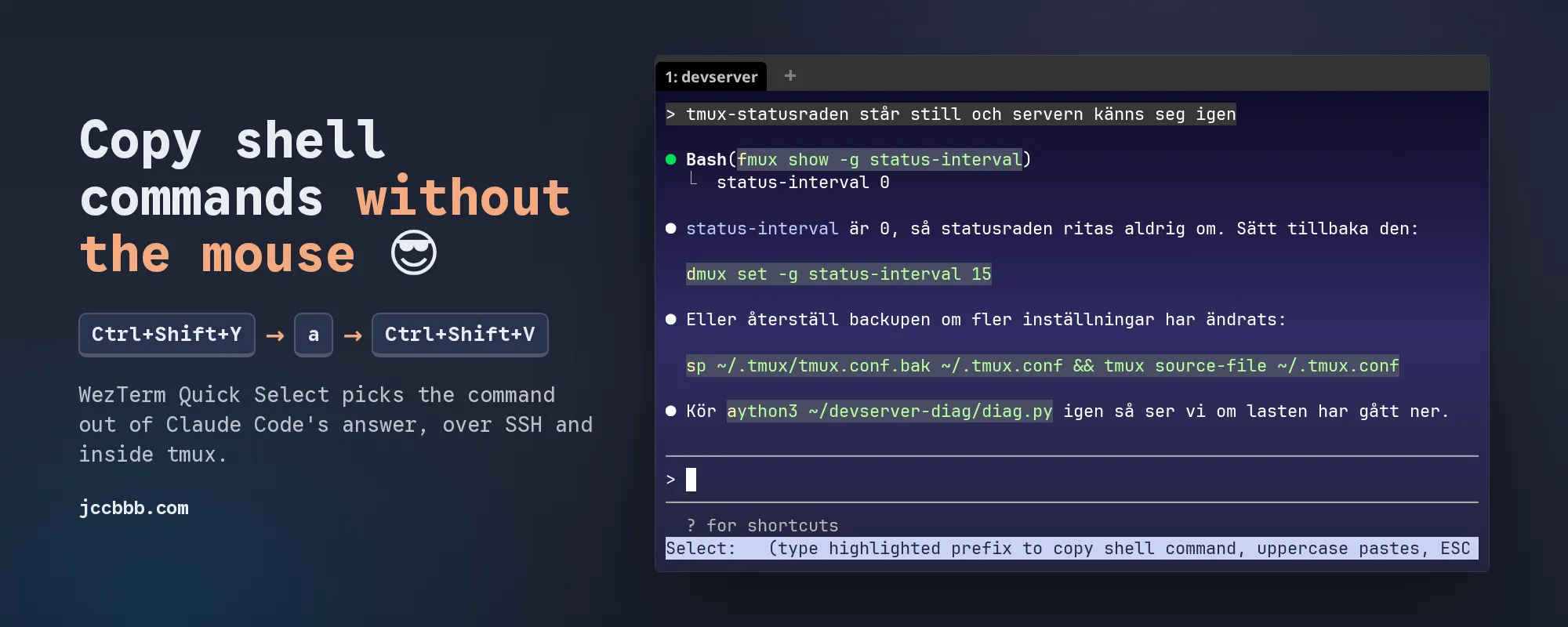
Claude Code tells me to run things all day. “Kör python3 ~/devserver-diag/diag.py igen”. “Run docker compose logs —tail 100 -f to investigate.” And every time I grab the mouse, drag over the command, miss by one word, drag again. In tmux. Over SSH. Haha, it gets old fast.
So now it’s Ctrl+Shift+Y, one letter, and the command is on my Windows clipboard. Then Ctrl+Shift+V wherever I want it. No mouse. 😎
My setup, same as in the Explorer post: WezTerm on Windows, WSL2, SSH to my devserver, tmux, and Claude Code inside tmux.
The problem
This is what Claude Code looks like in my terminal. Commands on their own lines, commands in the middle of a Swedish sentence, and the one it ran itself.
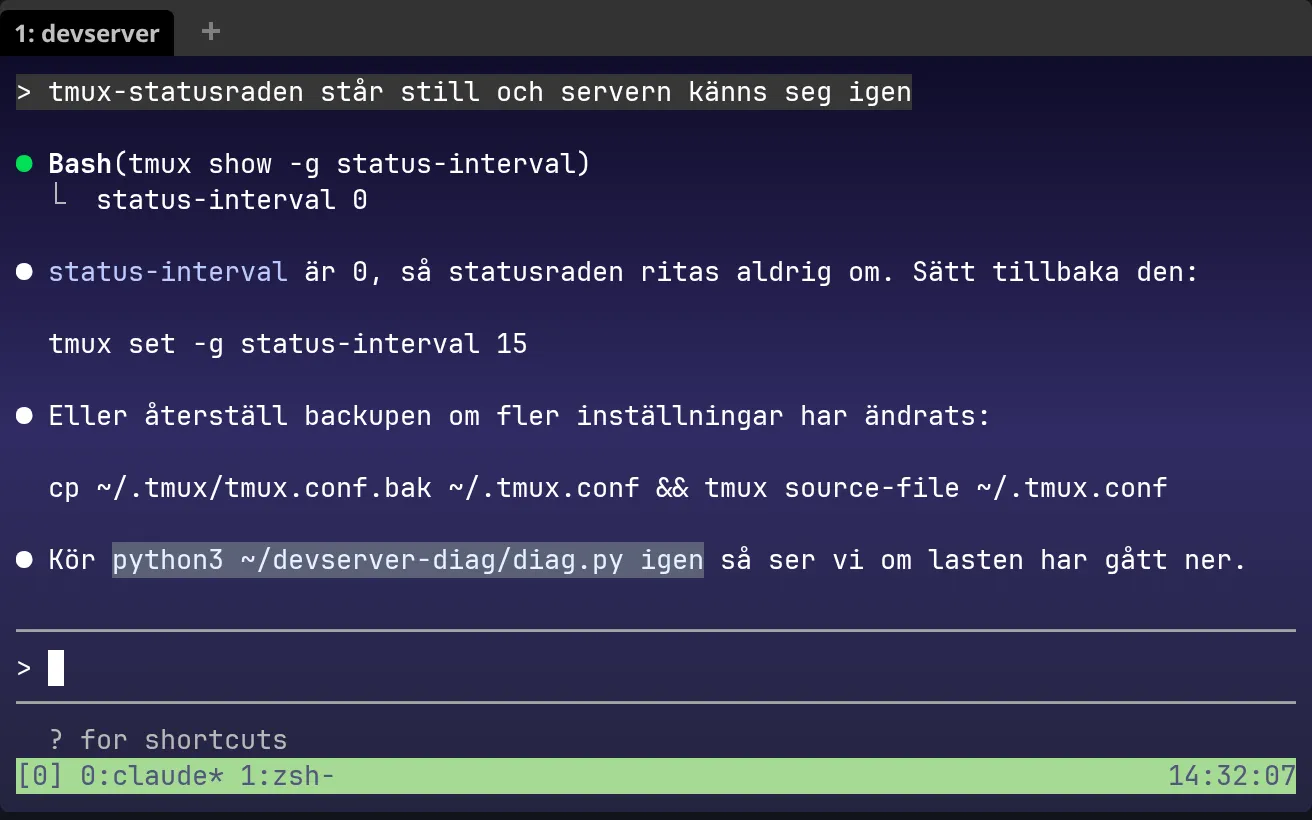
Notice the selection. It took “igen” too. Every. Time.
Also, Claude Code doesn’t show backticks. Inline code is just a different colour, so you can’t look for backticks either.
The fix: Quick Select
WezTerm has a thing called Quick Select. You press a key, it searches the screen with regexes, and every match gets a small letter. Press the letter and it’s copied. I already used it for URLs on Ctrl+Shift+U, so Ctrl+Shift+Y for commands felt right.
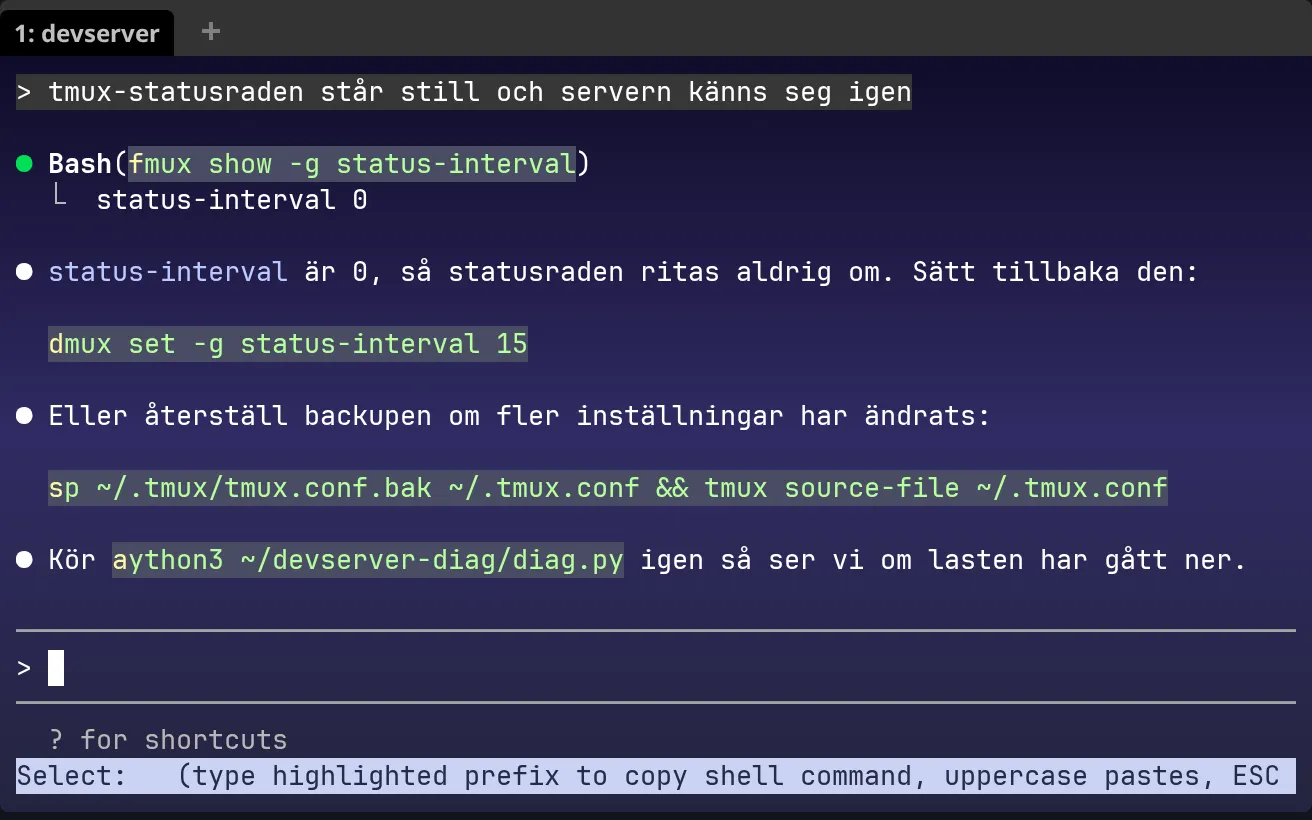
The letter is drawn on top of the first character, so “fmux” is just tmux with an f on it, haha. Press a and you get exactly python3 ~/devserver-diag/diag.py. Not “Kör”, not “igen”.
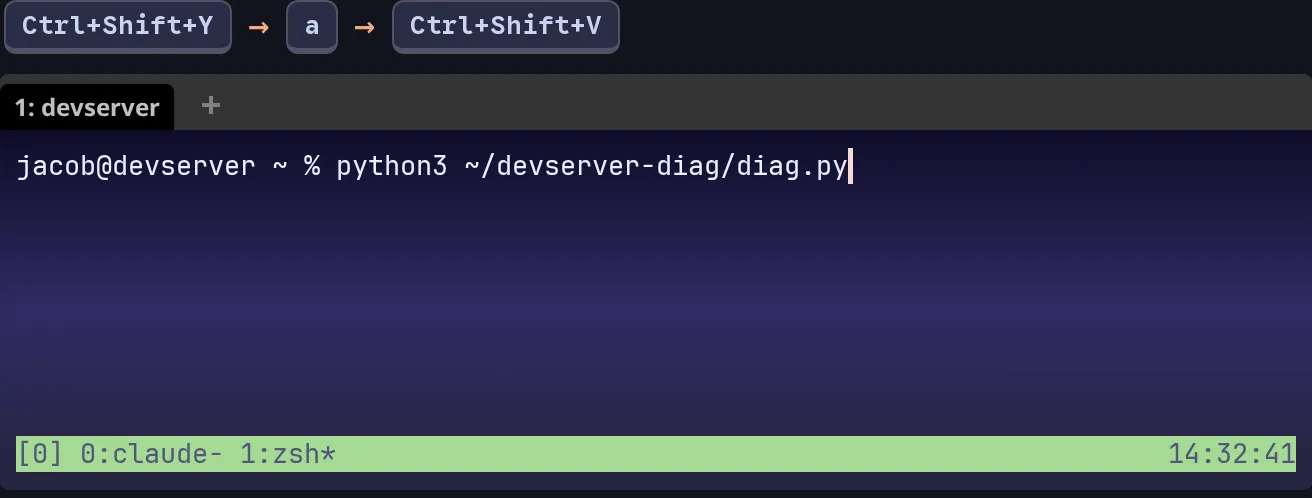
It only copies. Nothing runs. If you type the letter in upper case WezTerm pastes it at the prompt for you, but it still never presses Enter.
And it works over SSH and in tmux for a simple reason: WezTerm reads what’s on the screen, on Windows. The devserver doesn’t need anything installed.
What it picks out
| On screen | Copied |
|---|---|
Kör python3 ~/devserver-diag/diag.py igen | python3 ~/devserver-diag/diag.py |
Run docker compose logs --tail 100 -f to investigate. | docker compose logs --tail 100 -f |
Du kan också köra docker compose ps (t.ex. för att se status). | docker compose ps |
Use find . -name '*.py' to list them. | find . -name '*.py' |
● Bash(cd ~/dev/onevision && git status --short) | cd ~/dev/onevision && git status --short |
tmux set -g status-interval 15 | the whole line |
cp ~/.tmux/tmux.conf.bak ~/.tmux.conf && tmux source-file ~/.tmux.conf | the whole line |
And the long one with quotes and a #(...) inside also comes out whole:
tmux set -g status-right '#(/home/jacob/.tmux/plugins/tmux-continuum/scripts/continuum_save.sh)%H:%M:%S'How it works (short version)
Four patterns:
Bash(...)lines, the commands Claude Code ran itself.- Anything in backticks, for raw markdown.
- A whole line that starts with a known program (200 of them:
tmux,docker,git,python3…) or a script path like./deploy.sh. Pipes, quotes,&&and redirects come along. - A command in the middle of a sentence. It starts at a known program and stops at the first “normal” word, in English or Swedish: to, and, then, igen, och, så, sen… Plus
.,)at the end are left out.
The trick that makes number 4 possible: WezTerm only highlights the capture group. So each pattern has one ( ) around the command, and everything around it uses (?: ). The sentence can be matched, but only the command is copied.
Words like cat, find and make are also normal English (“cat the file”, “find out why”), so in a sentence they only count if the next word looks like shell: a flag, a path, a glob.
The config
Paste this into .wezterm.lua, just above return config. Take a backup first:
copy %USERPROFILE%\.wezterm.lua %USERPROFILE%\.wezterm.lua.bakIf you already have a Ctrl+Shift+Y binding, remove it, otherwise you have two. Everything else in your config stays. WezTerm reloads by itself when you save, and Ctrl+Shift+L shows the debug overlay if something is wrong.
-- ============================================================================
-- Copy shell commands from terminal output with Quick Select
--
--   Ctrl+Shift+Y        every command on screen gets a letter (a, s, d, f ...)
--                       press the letter and the command is on the clipboard
--   Ctrl+Shift+Alt+Y    same thing, but every line gets a letter, for whatever
--                       the patterns below miss
--
-- Copies only. Nothing is pasted or run unless you type the letter in UPPER
-- case, then WezTerm pastes it at the prompt (still without Enter).
-- Works over SSH and inside tmux, because WezTerm reads what is on the screen.
--
-- WezTerm only highlights the capture group of a pattern, so every pattern has
-- exactly one ( ... ) around the command and (?: ... ) everywhere else.
-- The patterns are tested with fancy_regex 0.11, the regex engine in
-- WezTerm 20240203.
--
-- Paste this whole block after config.keys, just above "return config".
-- ============================================================================

-- Programs that are almost never a normal word in a sentence.
local programs = {
  "python3", "python", "pip3", "pip", "pipx", "uv", "uvx", "poetry",
  "node", "npm", "npx", "pnpm", "yarn", "bun", "deno", "tsx",
  "cargo", "rustup", "rustc", "php", "composer", "ruby", "gem", "bundle",
  "bash", "zsh", "sh",
  "docker", "docker-compose", "podman", "kubectl", "helm", "k9s",
  "git", "gh", "ssh", "ssh-keygen", "ssh-copy-id", "scp", "sftp", "rsync",
  "curl", "wget", "tmux", "systemctl", "journalctl",
  "apt", "apt-get", "apt-cache", "dpkg", "dnf", "yum", "pacman", "brew", "snap",
  "cp", "mv", "rm", "mkdir", "rmdir", "ln", "chmod", "chown", "chgrp",
  "ls", "ll", "eza", "exa", "cd", "pwd", "df", "ncdu", "htop", "btop",
  "ps", "pgrep", "pkill", "killall", "lsof", "netstat", "nslookup", "openssl",
  "lsblk", "blkid", "umount", "smartctl",
  "grep", "egrep", "rg", "fd", "fzf", "sed", "awk", "xargs", "tr", "uniq", "tee",
  "tar", "gzip", "gunzip", "zip", "unzip", "jq", "yq",
  "nano", "vim", "nvim", "zed",
  "nvidia-smi", "qm", "pct", "pvesh", "pveversion", "pvecm", "zfs", "zpool",
  "ansible", "ansible-playbook", "terraform", "tofu",
  "wrangler", "cloudflared", "tailscale",
  "claude", "opencode", "ollama", "ffmpeg", "ffprobe", "yt-dlp",
  "sqlite3", "mysql", "mysqldump", "psql", "pg_dump", "redis-cli",
  "certbot", "crontab", "sudo", "doas", "nohup", "env", "echo", "printf",
  "uname", "whoami", "hostname", "hostnamectl", "uptime",
  "nc", "ss", "ip", "ifconfig", "traceroute", "mtr", "ufw", "iptables",
  "wsl", "powershell", "pwsh",
}

-- Programs that are also ordinary words: "cat the file", "find out why",
-- and Swedish "du", "dig", "vi", "man". In the middle of a sentence they only
-- count when the next word looks like shell (-flag, a/path, ~, *.log, x=y).
local word_programs = {
  "cat", "find", "make", "watch", "head", "tail", "less", "more", "sort", "cut",
  "touch", "tree", "top", "free", "kill", "date", "history", "source", "alias",
  "export", "diff", "patch", "which", "file", "test", "time", "type", "read",
  "open", "service", "mount", "screen", "ping", "dig", "du", "vi", "man", "go",
  "code", "bat", "fish",
}

-- Words that end a command in the middle of a sentence, in English and Swedish:
-- "Kör python3 ~/diag.py igen", "Run docker ps to check". Only whole,
-- unquoted words count, so "igenom" or "-i" are fine.
local stop_words = {
  -- English
  "to", "and", "then", "again", "or", "if", "so", "but", "also", "first",
  "instead", "afterwards", "after", "before", "when", "which", "that", "this",
  "it", "you", "your", "we", "i", "the", "a", "an", "is", "are", "was", "will",
  "should", "would", "could", "can", "may", "might", "see", "now", "here",
  "there", "in", "into", "inside", "from", "with", "without", "for", "of",
  "at", "by", "as", "once", "until", "while", "since", "because", "please",
  "just", "manually", "later", "too", "what", "why", "how", "where", "who",
  "shows", "lists", "prints", "returns", "gives", "displays", "tells", "does",
  "removes", "deletes", "creates", "opens", "outputs", "restarts", "starts",
  "stops", "checks", "means",
  -- Swedish
  "igen", "och", "att", "så", "sen", "sedan", "eller", "om", "när", "först",
  "efteråt", "efter", "istället", "innan", "med", "utan", "för", "på",
  "från", "till", "det", "den", "detta", "du", "din", "ditt", "dina", "vi",
  "jag", "man", "kolla", "se", "nu", "här", "där", "då", "också", "bara",
  "alltså", "dvs", "mot", "vid", "som", "är", "var", "blir", "ska", "kan",
  "kommer", "ger", "visar", "listar", "skriver", "startar", "stoppar", "tar",
  "gör", "betyder", "öppnar", "raderar", "skapar", "körs", "kör", "behöver",
  "borde", "igång", "direkt", "sist", "gärna", "typ", "alltid", "aldrig",
  "ändå", "väl", "ju", "nog", "inte", "ingen",
}

local function any_of(words)
  return "(?:" .. table.concat(words, "|") .. ")"
end

local PROGRAM = any_of(programs)
local WORD_PROGRAM = any_of(word_programs)

-- A stop word, as a whole word, possibly followed by . , ; : ! ? )
local STOP = "(?i:" .. table.concat(stop_words, "|") .. [=[)(?=[.,;:!?)"']*(?:\s|$))]=]

-- One piece of a word: a quoted string, $( ... ), or one ordinary character.
-- The tmux pane border and Claude Code's box border are never part of a word.
local PIECE = [=[(?:'[^']*'|"[^"]*"|\$\([^)]*\)|[^\s'"│])]=]

-- A whole word, including any punctuation (for commands on their own line).
local LINE_WORD = PIECE .. "+"

-- A word that does not end in sentence punctuation (for commands in a sentence).
-- A lone . or .. followed by a space is fine: "find . -name x", "cd .. and".
local WORD = [=[(?:\.{1,2}(?=\s)|]=] .. PIECE
  .. [=[*(?:'[^']*'|"[^"]*"|\$\([^)]*\)|[^\s'"│.,;:!?)]))]=]

-- The next word looks like shell: -flag, ./x, ~/x, /x, . , a/b, x=y, *.log, $X, file.ext
local LOOKS_LIKE_SHELL = [=[(?=-|~|\.{1,2}(?:/|\s|$)|/|\S*[/=*$]|[\w-]+\.\w)]=]

-- A script started by its path: ./deploy.sh, ~/bin/backup.sh, /opt/x/run.py
local SCRIPT = [=[(?=\./|[~/][^\s'"│]*\.(?:sh|bash|py|js|mjs|ts|pl|rb|php)(?!\w))]=]

-- KEY=value in front of a command: NODE_ENV=production npm run build
local ENV = [=[(?:[A-Za-z_][A-Za-z0-9_]*=[^\s'"]*\s+)*]=]

-- One more argument, as long as it is not a stop word. A word starting with #
-- is a shell comment and ( is never a plain argument: "docker ps (t.ex. ...)".
local ARG = [=[\s+(?!]=] .. STOP .. [=[|[#(])]=] .. WORD
local LINE_ARG = [=[\s+(?!]=] .. STOP .. [=[|[#(])]=] .. LINE_WORD

local shell_command_patterns = {
  -- 1. The command Claude Code itself ran:  ● Bash(docker compose ps)
  [=[\bBash\((.+)\)[ \t]*$]=],

  -- 2. Anything between backticks, for raw markdown and commit messages.
  [=[`([^`]+)`]=],

  -- 3. A command on its own line, the whole line, with pipes, quotes and &&.
  --    Optional indentation and a "$ " or "❯ " prompt in front, a trailing
  --    # comment is left out (zsh would pass it on as arguments). If the line
  --    turns into a sentence ("docker ps lists all containers"), pattern 4
  --    picks out the command instead.
  [=[^[ \t]*(?:[$❯]\s+)?(]=] .. ENV
    .. "(?:(?:" .. PROGRAM .. "|" .. WORD_PROGRAM .. [=[)(?=\s|$)|]=] .. SCRIPT .. LINE_WORD .. ")"
    .. "(?:" .. LINE_ARG .. ")*"
    .. [=[)(?:[ \t]+#.*)?[ \t]*$]=],

  -- 4. A command in the middle of a sentence, from the program up to the
  --    first stop word or the end of the sentence:
  --    "Kör python3 ~/devserver-diag/diag.py igen" -> python3 ~/devserver-diag/diag.py
  --    An opening quote is skipped, but only after a space, so "I'll check"
  --    does not turn into the command "ll check".
  [=[(?:^|(?<=[\s(„"«:]))'?(]=] .. ENV .. "(?:"
    .. PROGRAM .. "(?:" .. ARG .. ")+"
    .. "|" .. WORD_PROGRAM .. [=[\s+]=] .. LOOKS_LIKE_SHELL .. WORD .. "(?:" .. ARG .. ")*"
    .. "|" .. SCRIPT .. WORD .. "(?:" .. ARG .. ")*"
    .. ")" .. [=[)(?=[.,;:!?)"']*(?:\s|$))]=],
}

-- Wrap each pattern in (?: ... ), because WezTerm joins them with | as they are.
for i, pattern in ipairs(shell_command_patterns) do
  shell_command_patterns[i] = "(?:" .. pattern .. ")"
end

local copy_shell_command_keys = {
  {
    key = "y",
    mods = "CTRL|SHIFT",
    action = wezterm.action.QuickSelectArgs {
      label = "copy shell command",
      patterns = shell_command_patterns,
      -- Only search the screen (and one screen up), so the labels stay single letters.
      scope_lines = 0,
      action = wezterm.action.CopyTo "Clipboard",
    },
  },
  {
    key = "y",
    mods = "CTRL|SHIFT|ALT",
    action = wezterm.action.QuickSelectArgs {
      label = "copy line",
      -- Every non-empty line, without Claude Code's ● ⏺ ⎿ markers or a prompt.
      patterns = { [=[^\s*(?:[●⏺⎿│>❯$]\s*)*(\S(?:.*\S)?)\s*$]=] },
      scope_lines = 0,
      action = wezterm.action.CopyTo "Clipboard",
    },
  },
}

config.keys = config.keys or {}
for _, key in ipairs(copy_shell_command_keys) do
  table.insert(config.keys, key)
end.wezterm.lua
It only uses the five fields QuickSelectArgs has in WezTerm 20240203: action, alphabet, label, patterns, scope_lines. Newer options from nightly would break on a stable install.
Ctrl+Shift+Alt+Y is the backup plan: every line on screen gets a letter, minus Claude Code’s ● and ⎿ markers.
What about tricky commands?
They exist, haha. My first version turned “I’ll check the logs first.” into the command ll check. Because ll is a program and the apostrophe looked like a quote. Fixed, there’s a test for it now.
Some I just live with:
Use docker ps quicklycopiesdocker ps quickly. “quickly” isn’t on the stop list, and I’m not adding every adverb in English. 😅- Claude Code wraps long lines, so a command split over two lines only gets the first half.
for f in *.log; do gzip "$f"; doneonly gives yougzip "$f".
For those, Ctrl+Shift+Alt+Y and take the whole line.
The patterns are tested against 71 lines (standalone, Swedish, English, Claude Code output, and prose that should not match) with fancy_regex 0.11, the regex engine in WezTerm 20240203. All 71 pass. My first Ctrl+Shift+Y got 21 of them right. The 8 known misses are lines like the ones above.
Done
Ctrl+Shift+Y, a, Ctrl+Shift+V. That’s it. My mouse is getting lonely. 🐭